> For the complete documentation index, see [llms.txt](https://docs.tabnine.com/main/llms.txt). Markdown versions of documentation pages are available by appending `.md` to page URLs; this page is available as [Markdown](https://docs.tabnine.com/main/administering-tabnine/managing-your-team/settings/mcp-governance.md).
# MCP Governance
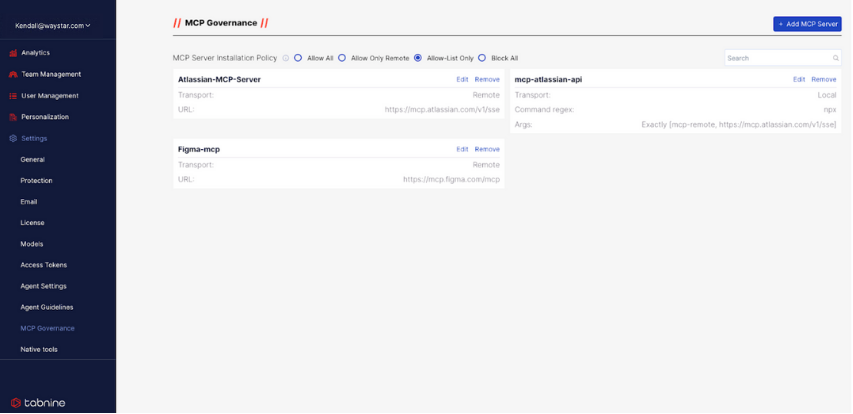
The Admin Console for MCP server governance in Tabnine
### Admin-Enforced MCP Server Whitelisting
Admins have the ability to limit what kind of MCP servers are permitted in the organization.
Beneath the **//**** MCP Governance ****//** title of the page, Admins will be able to see a menu of control options will appear that include:
* **Allow all** – No restrictions
* **Allow only remote** – Only StreamableHTTP/SSE transports will be permitted
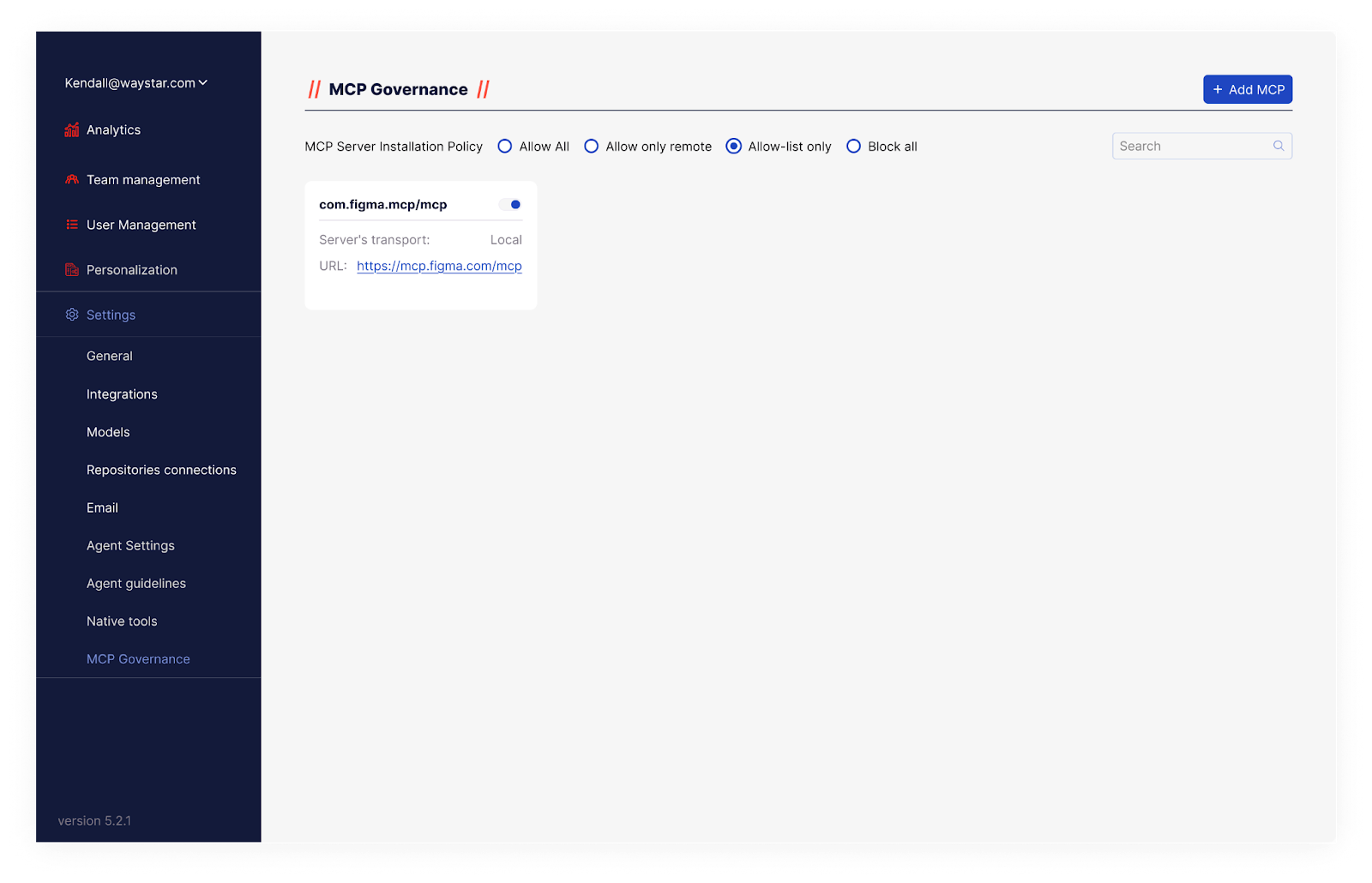
* **Allow-list only** – Only MCP servers in the allow list can be used
* **Block all** – Admins can disallow any MCP servers
### Adding an MCP Server
Under MCP Governance, you have the option to catalog MCP servers for use in an **Allow List.**
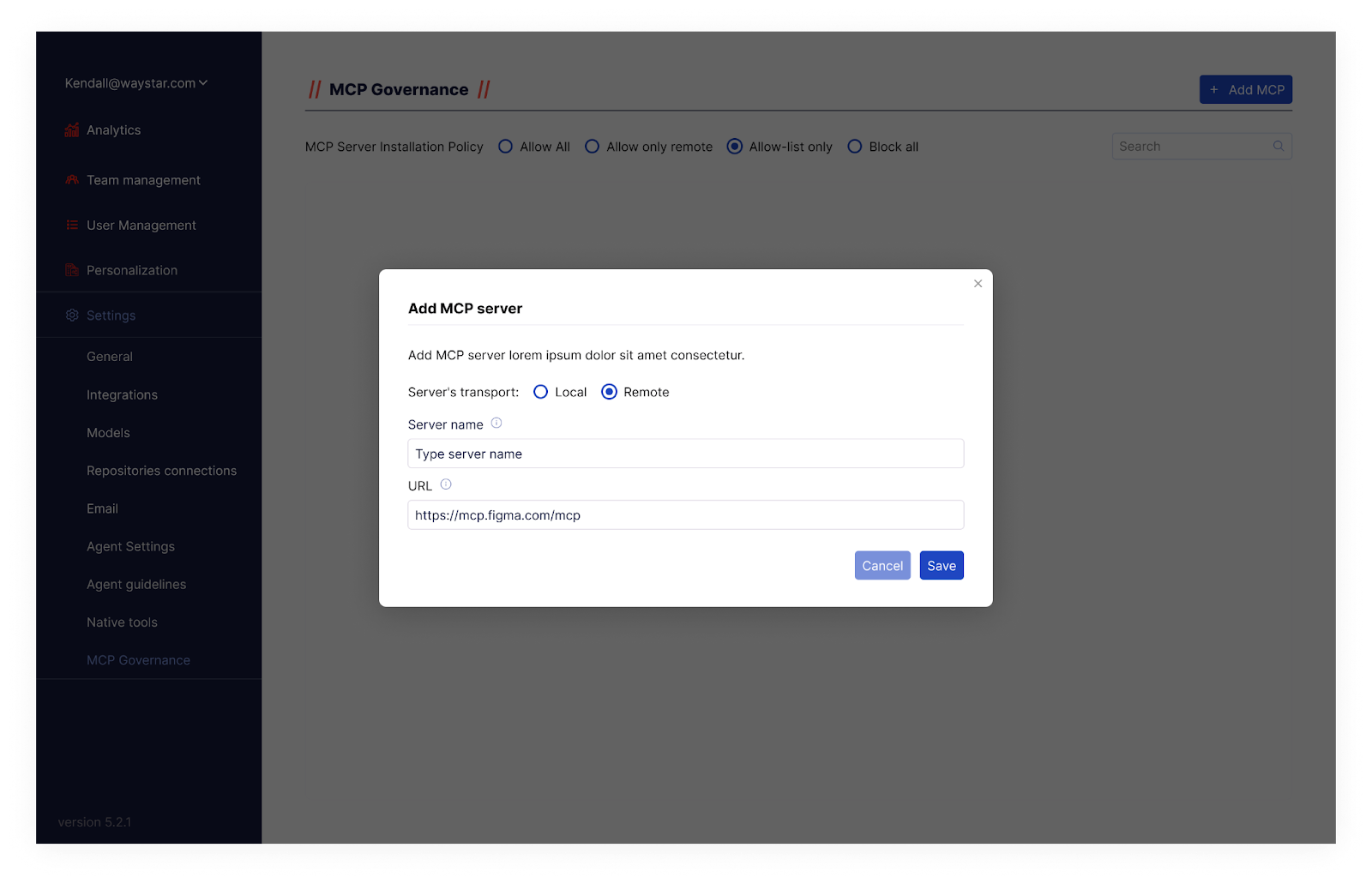
Simply go to the blue **+ Add MCP** button in the upper righthand corner of the screen and select.
A window will appear where you must input the server’s information.
If it is a remote MCP server, it must include the following:
* Server location (local or remote)
* The MCP server name\*\*
* The MCP server URL
{% hint style="info" %}
\*\*If the user specifies this server name in the `mcp_servers.json` file, then the associated configuration must be remote and have this URL.
{% endhint %}
If from a local (i.e. STDIO) server, it must **also** include:
* Command Regex
* `args`
* ‘Exact match’ toggle (Default is "no")\*\*\*
{% hint style="info" %}
\*\*\*
* "No" args in `mcp_servers.json` *must* contain those that occur in the **Allow List**.
* "Yes" means that those `args` must be used in the `mcp_servers.json` file.
{% endhint %}
Once you do that, hit **Save**.
### **Wildcard Patterns**
The MCP Governance remote server allowlist supports wildcard patterns, allowing admins to permit entire groups of subdomains or paths with a single entry instead of listing each URL individually.
Patterns follow the same conventions as [Chrome extension match patterns](https://developer.chrome.com/docs/extensions/develop/concepts/match-patterns):
| Component | Wildcard behavior |
| ---------- | ----------------------------------------------------------------------------------------------------------------------------------------------------------------------------------------------------------------------------------------- |
| **Scheme** | `*` matches `http` or `https` only |
| **Host** | `*` as a standalone host matches any host. `*.example.com` matches `example.com` and all subdomains, including multi-level (e.g., `foo.bar.example.com`). The `*` must be the first or only character and must be followed by `.` or `/`. |
| **Port** | `*` matches any port (e.g., `http://localhost:*/*`). If omitted, only default ports are matched. |
| **Path** | `*` can appear anywhere in the path and matches any characters. |
#### Examples
| Allowlist entry | Allows | Does not allow |
| ---------------------------- | --------------------------------- | ----------------------------------------------------- |
| `https://*.mcp.tabnine.com/` | `https://foo.mcp.tabnine.com` | `http://foo.mcp.tabnine.com` (wrong scheme) |
| | `https://foo.bar.mcp.tabnine.com` | `https://other.tabnine.com` (missing `mcp` subdomain) |
| `http://*.example.org/*` | `http://foo.example.org/bar/bla` | `https://foo.example.org/bar` (wrong scheme) |
#### **Restrictions**
Partial-label wildcards are not supported. Entries like `*foo.example.com` or `foo*bar.example.com` are rejected as invalid. In the host component, the `*` must be standalone or a prefix followed by a dot, and only one wildcard is permitted. Wildcards in username or password components are not supported.
---
# Agent Instructions
This documentation is published with GitBook. GitBook is the documentation platform designed so that both humans and AI agents can read, navigate, and reason over technical content effectively. Learn more at gitbook.com.
## Querying This Documentation
If you need additional information that is not directly available in this page, you can query the documentation by asking a question.
Perform an HTTP GET request on the following URL with the `ask` and `goal` query parameters:
```
GET https://docs.tabnine.com/main/administering-tabnine/managing-your-team/settings/mcp-governance.md?ask=&goal=
```
`ask` is the immediate question: it should be specific, self-contained, and written in natural language.
`goal` is what the user is ultimately trying to achieve, the reason they need the answer. Sharing it helps GitBook give you a better, more relevant answer. A goal is most helpful when it describes the outcome the user wants rather than restating the question. For example, with `ask=how do I create an API token`, a goal like `automate deployments from our CI pipeline` lets GitBook tailor the answer to that use case.
The response will contain a direct answer to the question and relevant excerpts and sources from the documentation.
Use this mechanism when the answer is not explicitly present in the current page, you need clarification or additional context, or you want to retrieve related documentation sections.