

# Models

{% hint style="warning" %}
The following models will no longer be supported after version 6.2.0 (mid-May):

* Tabnine-protected
* Gemma 3 or lower
* Qwen 2.5 or lower

Accounts that use these models wont be able to upgrade to this version
{% endhint %}

Tabnine provides various [AI models](/main/welcome/readme/ai-models.md) for Tabnine Chat. Tabnine Enterprise admins can connect Tabnine to their internal endpoints to enrich the Tabnine Chat experience for users. This allows administrators to integrate their company's private LLM instances, making them accessible to the engineering team directly within Tabnine.

{% hint style="info" %}
**Note**

Tabnine's code completions only use the **Tabnine Universal code completions model,** which is both private and protected.
{% endhint %}

### Private Model Endpoints Supported by Tabnine

{% hint style="info" %}
**Note**

The list of supported models is updated frequently as new models become available.
{% endhint %}

Currently, Tabnine supports the following model providers for private endpoint connections:

<table><thead><tr><th width="61.4912109375"></th><th width="171.7060546875">Model</th><th>Bedrock</th><th>GCP Vertex AI</th><th>Azure</th><th>OpenAI</th><th>OpenAI-Compatible</th></tr></thead><tbody><tr><td><img src="/files/KIxcWuNTeFglIToJ1TOO" alt=""></td><td>Claude 4.6 Sonnet</td><td>✓</td><td>✓</td><td></td><td></td><td></td></tr><tr><td><img src="/files/KIxcWuNTeFglIToJ1TOO" alt=""></td><td>Claude 4.6 Opus</td><td>✓</td><td>✓</td><td></td><td></td><td></td></tr><tr><td><img src="/files/KIxcWuNTeFglIToJ1TOO" alt=""></td><td>Claude 4.5 Sonnet</td><td>✓</td><td>✓</td><td></td><td></td><td></td></tr><tr><td><img src="/files/KIxcWuNTeFglIToJ1TOO" alt=""></td><td>Claude 4.5 Opus</td><td>✓</td><td>✓</td><td></td><td></td><td></td></tr><tr><td><img src="/files/KIxcWuNTeFglIToJ1TOO" alt=""></td><td>Claude 4.5 Haiku</td><td>✓</td><td>✓</td><td></td><td></td><td></td></tr><tr><td><img src="/files/KIxcWuNTeFglIToJ1TOO" alt=""></td><td>Claude 4 Sonnet</td><td>✓</td><td>✓</td><td></td><td></td><td></td></tr><tr><td><img src="/files/4dtgR6lZK2KdD0FKnJE8" alt=""></td><td>Gemini 3.0 Pro</td><td></td><td>✓</td><td></td><td></td><td></td></tr><tr><td><img src="/files/4dtgR6lZK2KdD0FKnJE8" alt=""></td><td>Gemini 2.5 Flash</td><td></td><td>✓</td><td></td><td></td><td></td></tr><tr><td><img src="/files/4dtgR6lZK2KdD0FKnJE8" alt=""></td><td>Gemini 2.5 Pro</td><td></td><td>✓</td><td></td><td></td><td></td></tr><tr><td><img src="/files/MfGCArjNflkE2vlMbv1D" alt=""></td><td>GPT-5.4</td><td></td><td></td><td>✓</td><td>✓</td><td></td></tr><tr><td><img src="/files/MfGCArjNflkE2vlMbv1D" alt=""></td><td>GPT-5.3 Codex</td><td></td><td></td><td>✓</td><td>✓</td><td></td></tr><tr><td><img src="/files/MfGCArjNflkE2vlMbv1D" alt=""></td><td>GPT-5.2 Codex</td><td></td><td></td><td>✓</td><td>✓</td><td></td></tr><tr><td><img src="/files/MfGCArjNflkE2vlMbv1D" alt=""></td><td>GPT-5.2</td><td></td><td></td><td>✓</td><td>✓</td><td></td></tr><tr><td><img src="/files/MfGCArjNflkE2vlMbv1D" alt=""></td><td>GPT-5</td><td></td><td></td><td>✓</td><td>✓</td><td></td></tr><tr><td><img src="/files/MfGCArjNflkE2vlMbv1D" alt="" data-size="original"></td><td>GPT-4o</td><td></td><td></td><td>✓</td><td>✓</td><td></td></tr><tr><td><img src="/files/31ub9jAlMwkkkNctGS1t" alt="" data-size="original"></td><td>Devstral-Small-2-24B-Instruct-2512</td><td></td><td></td><td></td><td></td><td>✓</td></tr><tr><td><img src="/files/31ub9jAlMwkkkNctGS1t" alt="" data-size="original"></td><td>Devstral-2-123B-Instruct-2512**</td><td></td><td></td><td></td><td></td><td>✓</td></tr><tr><td><img src="/files/Q3WcyouKrls19ukiF0ma" alt=""></td><td>MiniMax 2.7</td><td></td><td></td><td></td><td></td><td>✓</td></tr><tr><td><img src="/files/UBFtbvBdHr6XVc2eZfAv" alt="" data-size="original"></td><td>Qwen-3-Coder-480B-A35B-Instruct</td><td></td><td></td><td></td><td></td><td>✓</td></tr><tr><td><img src="/files/UBFtbvBdHr6XVc2eZfAv" alt="" data-size="original"></td><td>Qwen-3-30B <strong>(Chat only)</strong></td><td></td><td></td><td></td><td></td><td>✓</td></tr></tbody></table>

{% hint style="info" %}
\*This list changes frequently\
\
\*\*Devstral 2 (123B parameters) is operating under a modified MIT license. If your organization's global consolidated monthly revenue is exceeding $20 million, utilizing this model requires Devstral's permission.
{% endhint %}

#### Integration Requirements for Models

<img src="/files/JjlvZ4gytknQyFjFLGaJ" alt="" data-size="line"> **Amazon Bedrock:** Region, Access Key ID, Secret Access Key | [Learn more](https://aws.amazon.com/bedrock/)
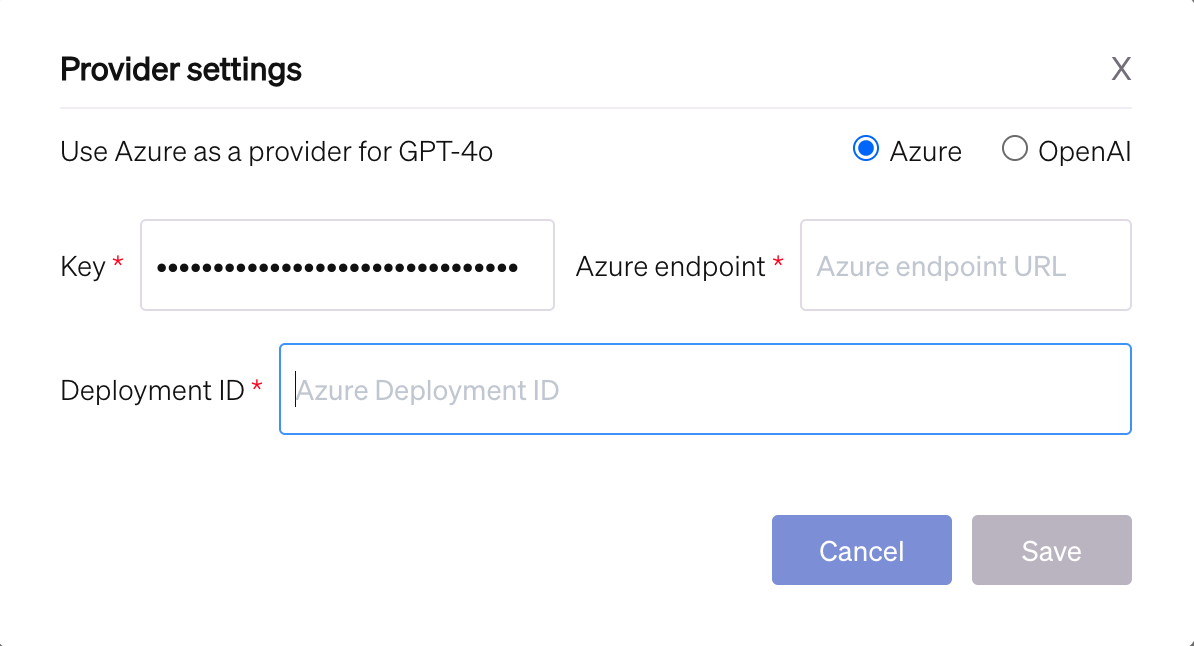
<img src="/files/vtIiXM8aZFF93VNhRrGS" alt="" data-size="line"> **Azure:** Azure endpoint, Key, Deployment ID | [Learn more](https://learn.microsoft.com/en-us/azure/machine-learning/how-to-configure-private-link?view=azureml-api-2\&tabs=cli)

<img src="/files/DCz39ycVVRJL3VHAt9tf" alt="" data-size="line"> **OpenAI:** Key, OpenAI endpoint | [Learn more](https://platform.openai.com/docs/overview)

<img src="/files/DCz39ycVVRJL3VHAt9tf" alt="" data-size="line"> **OpenAI-Compatible:** Llama endpoint, OpenAICompatible Model name

<img src="/files/xX00gXsOROwqy4N2ZJz4" alt="" data-size="line"> **Google Vertex AI:** Region, Project ID, Service Account | [Learn more](https://cloud.google.com/vertex-ai/docs)

### Viewing and setting up the available chat models

{% hint style="info" %}
**Note**\\

If this functionality isn't visible, we recommend contacting your dedicated account manager at Tabnine. They'll assist you in setting the available chat AI models for your team.
{% endhint %}

Admins manage the available chat models for their accounts and set up private endpoints for chat models:

1. Sign in to the Tabnine console as an admin.
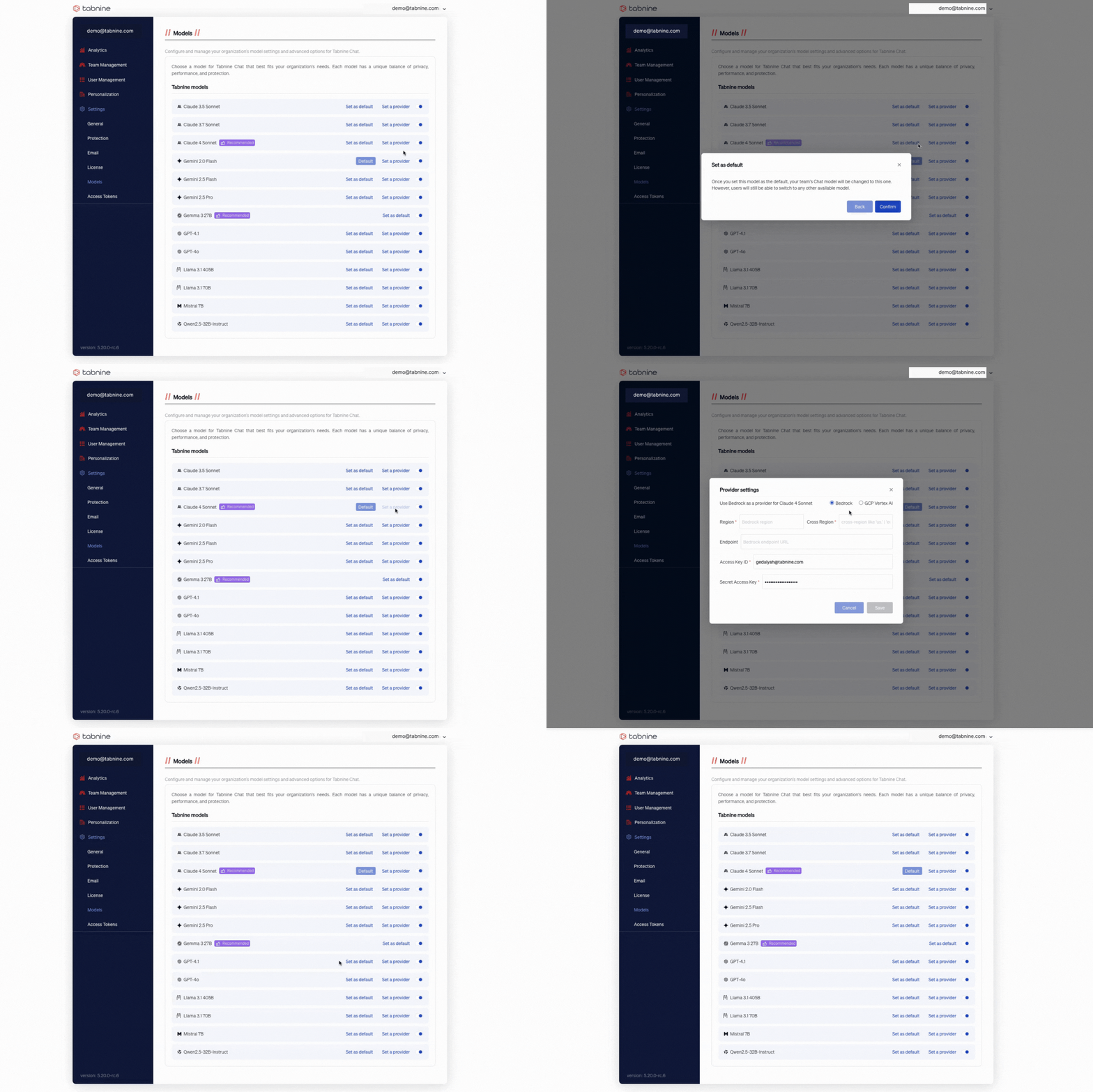
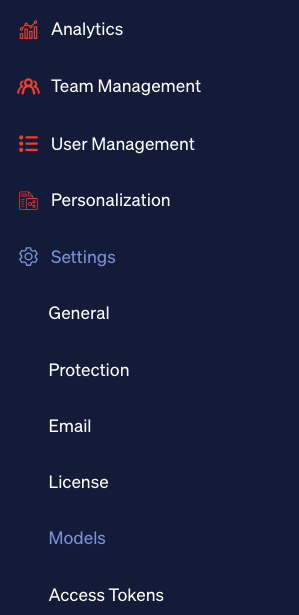
2. Go to the **Models** page under **Settings:**
<figure><img src="/files/Mp6RZD0N3nMVG9D1pUNh" alt=""><figcaption></figcaption></figure>

3. Toggle a model on and enter the relevant provider settings for your private endpoint.

<figure><img src="/files/hvWv2mfx0wtZXKBUQQw2" alt=""><figcaption></figcaption></figure>

<figure><img src="/files/g8C2RqlL1HzTkdoj5m9R" alt=""><figcaption></figcaption></figure>

### Setting the default chat model

Admins can set a model as the account's default chat model. The account default model is the default chat model for the account users. However, users can still switch to any other available model.

Change the account default model by expanding a specific model and toggling **Set as default.**

<figure><img src="/files/pMevV2BxP253DdC92Du8" alt=""><figcaption></figcaption></figure>

Change the account default model by expanding a specific model and toggling **Set as default.**

### Self-Managed Models ([v6.1.0](https://docs.tabnine.com/main/administering-tabnine/managing-your-team/settings/pages/risy3bTOlfBfgFRRXK8K#v6.1.0))

Self-Managed Models allows enterprise administrators to connect their own large language model (LLM) endpoints to Tabnine. The feature is designed for organizations that want to use self-managed models while keeping the familiar Tabnine governance, orchestration, and user experience.

#### Model Modes in the Admin Console

When you open the Admin Console and go to the Models section. Beneath the “Self-Managed” panel you will see a list of all models your organization has configured, including their names, providers, and availability for Chat or Agent use.

<figure><img src="/files/JBXAPX2BCJxbgR6iLu2f" alt=""><figcaption></figcaption></figure>

Each model entry also shows whether it is set as the default for Chat or Agent. This makes it easy to see which models are active and how they are being used.

#### Adding a Self-Managed Model

To add a new self‑managed model, click Add model on the right side of the Models page. This opens the Add AI Model wizard, where you choose a provider, enter credentials, and define model details.

On the Provider step, select the AI provider you want to configure (for example, ChatGPT, Amazon Bedrock, GCP Vertex AI, Azure AI Foundry, or an OpenAI‑compatible endpoint).

<figure><img src="/files/6LOBsmRMmbK1HWGoZxWy" alt=""><figcaption></figcaption></figure>

On the Credentials step, enter the authentication details required for that provider. For example, Amazon Bedrock requires a region, access key ID, secret access key, and an optional custom endpoint.

You can also load an existing credential configuration instead of entering new values.

<figure><img src="/files/wiVvEllcO70tfJTTHLL5" alt=""><figcaption></figcaption></figure>

On the Model Details step, provide the technical model name (the exact identifier used by the provider API) and an optional display name for users. Then configure limits such as maximum context length, maximum tokens per request, and maximum response tokens.

<figure><img src="/files/VxaxzGszlZ5WrpHPMCO0" alt=""><figcaption></figcaption></figure>

These settings ensure Tabnine can connect securely to your provider, identify the correct model, and apply token limits that match your organization’s policies. When you are done, click Run Test to verify the connection, then save the model.

#### Managing Models and Defaults

Once you save your new model, it appears in the list of self-managed models. You can see which models are active, which are available for Chat or Agent, and which are set as defaults.

If you want to change the default model for Chat or Agent, you can do so directly from this list by clicking “Set default” next to the relevant model. Only one model can be the default for each use case at any time.

You cannot disable or remove a model that is set as a default without first changing the default to another model.

#### Editing and Deleting Models

Editing or deleting a model follows the same pattern as adding one. You can open the model’s settings to update provider details, token limits, or other configuration values.

You can remove a model entirely as long as it is not set as a default. If a model is the default for Chat or Agent, you need to assign another model as the default before deleting or disabling it.

All changes, including mode switches, additions, edits, and deletions, are logged for audit and analytics purposes. This supports your organization’s governance and compliance requirements.

#### Quotas, Reporting, and Security

BYOAI affects how Tabnine handles quotas, cost controls, and reporting. Usage limits and reporting mechanisms apply to both Tabnine-managed and self-managed models.

If your organization tracks token consumption or costs, these metrics include activity from self-managed models. From a security perspective, Tabnine sends prompts and requests to the model endpoints you configure.

The user experience and governance controls remain the same. Users continue to interact with Tabnine through their usual interfaces, and all orchestration is handled as before.

\ <br>


---

# Agent Instructions: Querying This Documentation

If you need additional information that is not directly available in this page, you can query the documentation dynamically by asking a question.

Perform an HTTP GET request on the current page URL with the `ask` query parameter:

```
GET https://docs.tabnine.com/main/administering-tabnine/managing-your-team/settings/models-settings.md?ask=<question>
```

The question should be specific, self-contained, and written in natural language.
The response will contain a direct answer to the question and relevant excerpts and sources from the documentation.

Use this mechanism when the answer is not explicitly present in the current page, you need clarification or additional context, or you want to retrieve related documentation sections.